
Document AI
From documents to reconciled records
An invoice arrives as a PDF. Here is how it becomes checked, reviewable records matched against a ledger, step by step, on sample data.
Zryth · October 2026 · 6 min read
Invoices arrive as PDFs
In many finance teams an invoice is a PDF in an inbox. Someone reads it, types the numbers into another system, hunts for the purchase order and the matching record, and chases anything that does not agree. Each step is simple. Together they are slow, and they are where mistakes get in.
This walkthrough follows one sample invoice through the workflow we would build around your documents. Everything on this page runs on sample data in your browser: the invoice is a published sample from Microsoft's Azure samples, and the ledger is a synthetic one made up for the demo.
The workflow
- Document arrives
- Scan and read
- Extract fields
- Compare with ledger
- Surface exceptions
- Review
- Export
Step one: the document is read
The page arrives, is scanned, and its fields are read: vendor, invoice number, dates, purchase order and the totals. Each value stays linked to the place on the page it came from, so a reviewer can always see where a number was read.
Interactive demo · sample data
Step 1 of 3: Document arrives
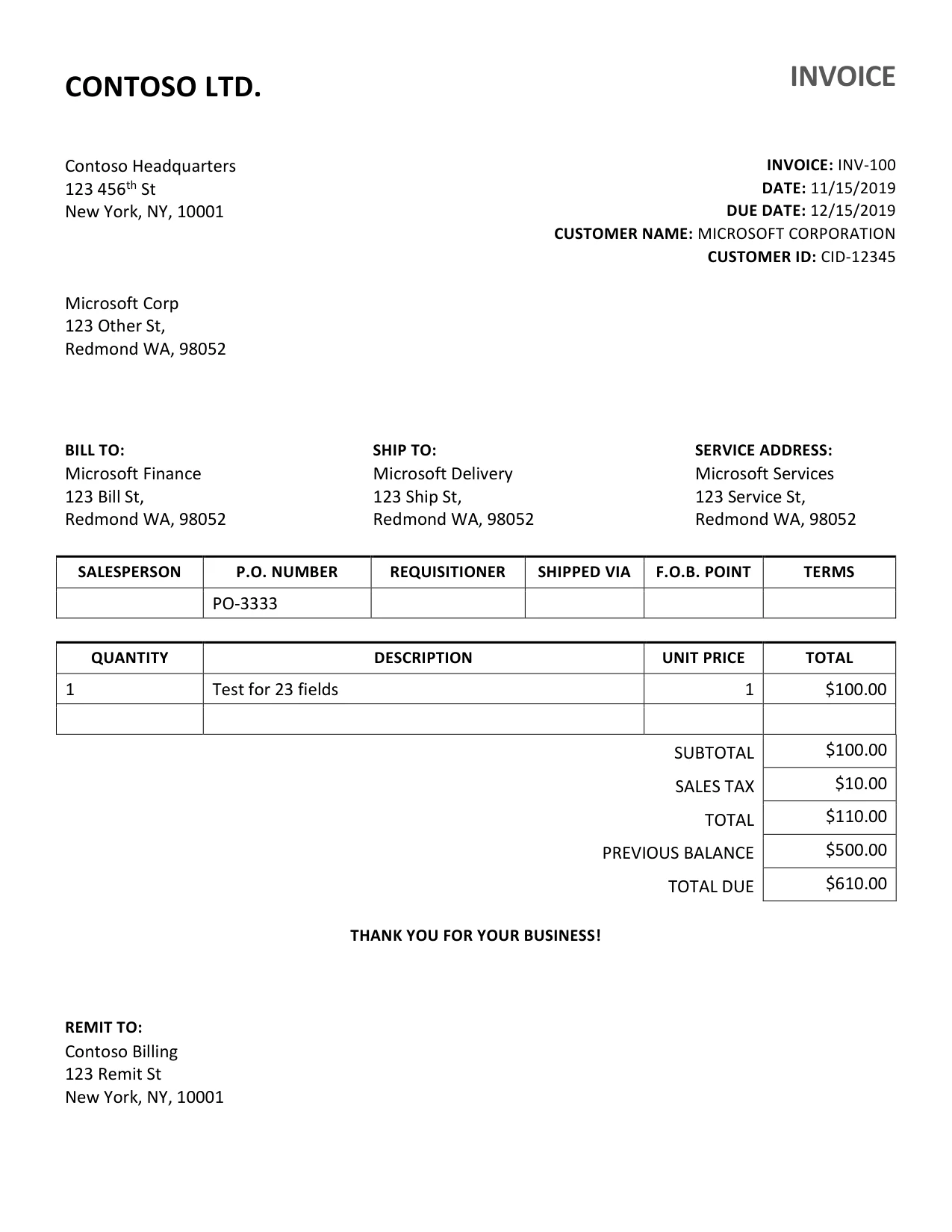
Sample invoice, page 1. Select a field to see where it was read.
Extracted fields
Sample invoice and extraction fixture: Microsoft Azure-Samples (MIT licence). Not a Zryth result. Select any field to see its source region.
Notice that the invoice total ($110.00) is kept separate from the previous balance ($500.00) and the amount due ($610.00). They sit close together on the page and mean different things, so the workflow treats them as different fields. The values shown come from a published sample extraction file. Reading a document is only the starting point.
Step two: compare it with your records
A value on its own is not an answer. What matters is whether the invoice agrees with what your ledger already says. The matching rules normalise names and numbers, find the ledger entry for the same vendor and invoice, then check for duplicates, the purchase order and the total.
Interactive demo · sample data
Step 1 of 2: Compare with ledger
Sample invoice, page 1. Select a field to see where it was read.
Ledger match
Synthetic ledger · sample dataThe ledger holds one entry for $110.00.
The comparison starts when this figure scrolls into view.
Result
The result appears once the comparison finishes.
The result is computed in your browser by the matching rules, from whichever sample ledger case you pick. Nothing is hard-coded.
Pick a different ledger case and the result changes, because it is computed from the case rather than written in advance. If the ledger says $100.00, the rules report a $10.00 difference. If two entries share the same vendor and invoice number, the invoice is flagged as a possible duplicate. Choose Why? to read the reasoning in plain language.
Step three: a person decides, and the records leave
Exceptions are not hidden or quietly fixed. They go to a person with the evidence beside them. That person approves or rejects, and the decision travels with the records when they are exported to your accounting workflow.
Interactive demo · sample data
Review status: Pending review
Review and export unlock once the comparison in Figure 2 has run.
Review status is local to this page. Both exports contain exactly the records shown above, plus the review status.
The completed outcome
Appears once the workflow above has played through. Use the controls to jump ahead.
Making it fit your business
Everything above is a design, shown on sample data. Building it for your team means connecting it to your real documents and records, and writing the matching rules around your own policies.
How Zryth can tailor it
Extraction is the starting point. We connect documents to your records, apply business rules and route exceptions for review.
- Source traceability: every value points back to where it was read.
- Normalization of vendor names, dates and amounts before matching.
- Matching rules written around your policies.
- Exception handling with a clear review step.
- Integration with your accounting workflow.
Zryth Case Studies
How an invoice becomes checked, reviewable records matched against a ledger, shown step by step on sample data.